
Made in America
Get Connected With



A Power Bank Rental Station is a self-service kiosk that lends portable chargers to people with low phone batteries. You may see one near a café counter, airport gate, shopping mall, or hotel lobby. The station usually contains several charging units, docking slots, and a screen or QR code. Users select a power bank, complete the rental process, and connect it to a phone with the correct cable. The experience should take less than a minute.
Behind this simple service is a managed network. Operators monitor battery inventory, charging performance, station status, and return locations. Many systems use mobile applications or web-based payment pages. Reliable stations should explain rental fees clearly and show whether a charger is available before checkout. They also need regular cleaning, cable inspection, and battery replacement. A damaged unit should not remain in circulation.
For users, convenience is the main value. A phone can stay active during a train delay, a business meeting, or an unfamiliar walk across town. Still, the service is not perfect. A nearby station may be empty, or a returned power bank may have a worn connector. That matters. Good providers reduce these problems through routine testing, visible support contacts, and practical return options. Understanding how a Power Bank Rental Station works helps customers judge its safety, cost, and usefulness before relying on it. Small details often decide whether the service feels dependable.
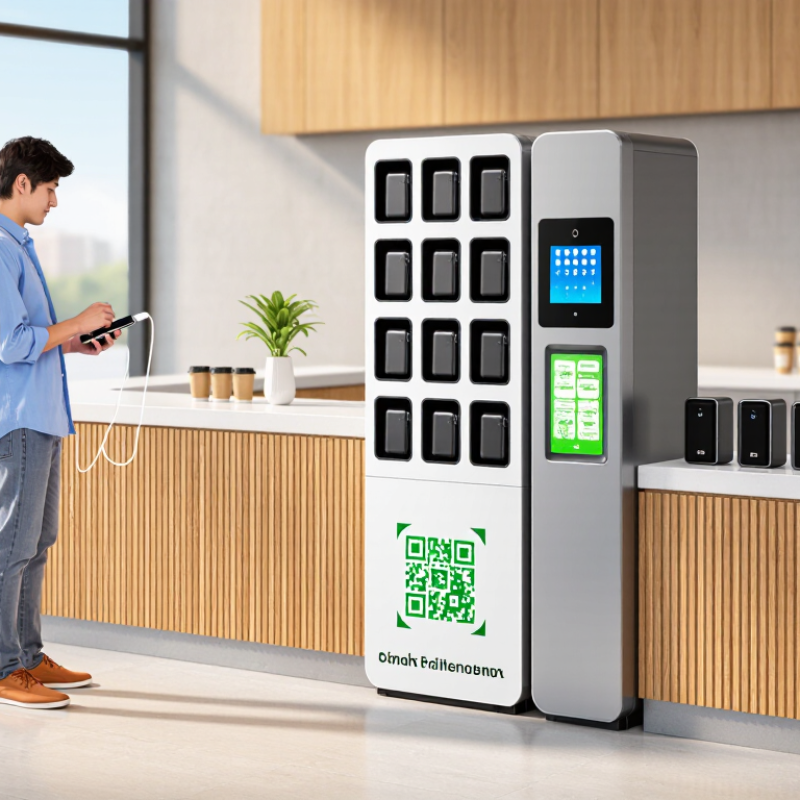
A power bank rental station is a public cabinet that stores portable chargers for temporary use. People locate an available unit, complete a digital rental process, and remove the charger. The station then records the checkout time and return status. Most units include several cable types, supporting common phones and small devices.
The process is simple.
A user scans the station’s code, reviews the rental terms, and releases one power bank. A charged battery can help during travel, shopping, work, or an unexpected low-battery moment. Many stations display battery levels through small indicators. Some also use charging slots that refill returned units automatically.
Safety and reliability matter.
A well-maintained station should protect charging ports from dust, inspect batteries regularly, and show clear pricing before checkout. Users should check the charger for cracks, unusual heat, or damaged cables. Stop using it if something seems wrong.
Not every station works perfectly. Availability may be limited, cables can wear out, and a return slot may be full. From practical use, checking the battery level before leaving saves frustration. Operators also need accurate records, visible instructions, and responsive customer support. The idea is convenient, but convenience still depends on careful maintenance.
What Is a Power Bank Rental Station?
A power bank rental station is a self-service charging point for people with low phone batteries. It stores several portable power banks inside a locked cabinet. Users scan a station code, select an available unit, and remove it within seconds. The system records the rental digitally. When the battery is restored, users return the power bank to any compatible station. Some stations also show battery levels, rental duration, and return instructions on a small screen.
How Power Bank Rental Stations Work
The process is simple, but the hardware is not. Each slot uses electronic locks, charging contacts, and sensors to confirm whether a power bank is present. A cloud platform tracks inventory, payment status, and station availability. According to Statista Digital Market Insights, the world had about 4.7 billion smartphone users in 2024. That large user base creates practical demand for emergency charging in transport hubs, restaurants, campuses, and event venues.
A 2024 report from Grand View Research valued the global power bank market in the billions of dollars and projected continued growth through the decade. Rental stations support that trend by replacing ownership with short-term access. In practice, operators must inspect cables, clean surfaces, and remove damaged units quickly. Small failures matter. A missing cable or confusing return slot can ruin the experience. The model also needs honest battery ratings, clear fees, and reliable customer support. These details are easy to underestimate.
The enclosure protects batteries from rain, dust, and careless handling. Each slot needs a clear status light and a firm locking mechanism.
Charging contacts should align accurately, because loose connections can cause heat and failed rentals. A controller records availability, charging progress, and return events.
The payment interface should show prices clearly before confirmation. A network module sends station data to a management dashboard.
Reliable stations also include ventilation, surge protection, and temperature monitoring.
These details are easy to overlook during installation. They matter during busy hours.
Place stations near entrances, counters, or waiting areas. Keep the screen visible, but avoid direct sunlight.
Test every slot with a real battery before opening. Check cables, locks, and charging speed weekly.
Leave space around the cabinet for inspection. Do not assume a full battery is healthy; capacity can decline quietly.
Clear instructions reduce support requests, especially for first-time users. Maintenance logs provide useful evidence when performance changes.
No design is perfect. Poor lighting, unstable internet, or crowded placement can weaken an otherwise capable system.
What Is a Power Bank Rental Station?
A power bank rental station is a self-service unit that stores portable chargers. Users borrow a charged device and return it to an available slot later. These stations are useful where people spend time away from wall outlets. Placement matters as much as the charger itself. A poorly positioned unit may be safe, yet remain unnoticed.
Where Power Bank Rental Stations Are Used
Power bank rental stations commonly appear in shopping centers, cafés, airports, train stations, hotels, and office buildings. They also serve universities, convention halls, cinemas, and busy restaurants. A traveler may need power after checking a ticket. A student may need it before a long lecture. At events, a station near entrances or seating areas can reduce interruptions. Clear instructions and visible pricing improve user confidence. Regular inspections are essential. Staff should check charging slots, cables, screens, and damaged casings. Availability should match peak periods, not quiet hours.
Tips: Place stations near entrances, counters, waiting areas, or information desks. Keep walking paths clear. Use strong lighting and simple instructions. Provide enough return slots during busy periods. Record maintenance checks and remove faulty units quickly. Test the process as a customer would. Small delays can discourage repeat use.
Some placement decisions still miss the mark. I have seen stations hidden behind furniture or placed far from seating. Convenient power only helps when people can find it easily. Safety notices should be readable, not crowded with technical language. Local facility rules should also guide installation and maintenance.
A power bank rental station allows users to borrow a portable charger from a self-service kiosk and return it to the same or another compatible station. These stations are commonly placed where people spend time away from electrical outlets.
The chart compares common deployment environments by typical user need and dwell-time potential. Shopping malls, transport hubs, restaurants, campuses, hotels, and event venues are suitable locations because visitors often use smartphones for navigation, payments, communication, and entertainment.
What Is a Power Bank Rental Station?
A power bank rental station stores portable chargers for temporary use. You scan a code, choose an available unit, and take it with you. Return it to the same station or another compatible location. This service helps when a phone reaches five percent during travel, shopping, or an unexpected delay. In practice, convenience is its strongest benefit.
Costs usually depend on rental time, location, and the charger’s capacity. A short rental may cost little, while overnight use can become surprisingly expensive. Check the displayed rate, deposit rules, and late-return charges before confirming. Some stations show prices clearly, but others may make the final amount easy to overlook. I would photograph the price screen for reference.
Safety deserves equal attention. Inspect the cable, casing, and charging port before connecting your device. Do not use a unit that feels unusually hot, smells strange, or has visible damage. Keep it away from water, direct sunlight, and tightly packed bags during charging. Use the station’s original cable when possible. Avoid charging while sleeping or leaving the power bank in a hot vehicle. A damaged battery can fail without much warning. After returning it, confirm that the station records the return. This small step prevents avoidable billing disputes. Personally, I would not trust every public charger automatically; convenience still requires judgment.
| Data Dimension | Typical Information | Practical Notes |
|---|---|---|
| Definition | A self-service kiosk that dispenses portable power banks and accepts their return. | Users generally start and end a rental through a QR code, mobile web page, or payment interface. |
| Primary Use Case | Temporary phone, tablet, or small USB-powered device charging while away from a wall outlet. | Common locations include shopping areas, transport facilities, hospitality venues, campuses, and event spaces. |
| Typical Battery Capacity | Approximately 5,000–10,000 mAh, or about 18.5–37 Wh at a nominal lithium-ion voltage of 3.7 V. | Usable energy is lower than the rated capacity because of voltage conversion and charging losses. |
| Charging Output | Commonly 5–20 W for shared rental power banks; some newer units support higher USB-C output. | Actual charging speed depends on the device, cable, connector, battery level, and supported charging protocol. |
| Connector Options | Usually integrated USB-C, Lightning-compatible, and Micro-USB cables, or a USB-C output port. | Connector availability varies by station design; users should check compatibility before renting. |
| Rental Duration | Often billed by time, such as hourly, daily, or in a combination of a starting fee and time-based charges. | The billing period and maximum charge should be displayed clearly before payment. |
| Illustrative Rental Cost | Approximately US$1–US$5 for a short rental, depending on location, duration, and local pricing. | This is a general market range rather than a universal price; taxes, deposits, and late fees may apply. |
| Potential Deposit or Authorization | Some systems place a temporary card authorization or require a refundable deposit. | The authorization amount is not necessarily the final rental fee and should be explained during checkout. |
| Station Capacity | Small units may hold roughly 6–12 power banks; larger installations may hold dozens. | Capacity affects availability during busy periods and the space required for installation. |
| Typical Station Power Requirement | Usually a standard AC outlet; actual consumption depends on the number of charging bays and charging rate. | The outlet, adapter, and installation should be suitable for the station’s rated electrical load. |
| Main User Benefits | Convenience, reduced need to carry a personal power bank, access to charging in public places, and flexible return options. | The service is most useful when a user needs emergency or short-term power rather than daily charging. |
| Operational Benefits for Venues | Adds a practical amenity, can increase visitor dwell time, and may reduce requests for staff charging assistance. | The venue should assess floor space, outlet access, network connectivity, maintenance, and customer support. |
| Lithium-Ion Safety Features | Protection against overcharging, over-discharging, short circuits, excessive current, and abnormal temperature. | Protection circuits reduce risk but do not eliminate the need for inspection, correct charging, and proper storage. |
| Battery Condition Checks | Units should be checked for swelling, dents, cracked housings, exposed wiring, leakage, overheating, or unusual odor. | Damaged or unusually hot power banks should be removed from service and handled under an appropriate battery-safety procedure. |
| Fire and Installation Considerations | Install on a stable, dry surface with ventilation and adequate clearance from heat sources and combustible materials. | Local electrical, fire, accessibility, and building requirements should be reviewed before installation. |
| User Safety Guidance | Keep the power bank dry, avoid crushing or opening it, do not use damaged cables, and stop using it if it becomes excessively hot. | Do not leave a visibly damaged or swollen battery unattended or place it in ordinary household trash. |
| Environmental Consideration | A shared system can reduce the number of infrequently used personal chargers, but it still creates battery and electronic waste. | End-of-life units should be collected and recycled through an approved battery or electronic-waste channel where available. |
Note: Prices, capacities, connector types, and operating procedures vary by location and equipment configuration. The cost figures above are general illustrative ranges in U.S. dollars.