How to Choose the Best Compact Laser Cutter for Your Needs
Choosing the right Compact Laser Cutter begins with the material, not the machine’s appearance. A polished enclosure can hide weak ventilation, limited software, or an undersized work area. Consider what you will actually cut: 3 mm plywood, acrylic sheets, leather, paper, or coated metal. Each material demands different power, speed, focus, and ventilation requirements.
Theodore H. Maiman, a laser pioneer, famously said, “The laser is a solution looking for a problem.” His warning remains useful. Do not buy the most powerful model automatically. Match the cutter to your projects, available space, budget, and learning curve. A desktop machine may suit small signs and model parts, while a larger bed helps with repeated production. Measure your workspace carefully. Leave room for cables, air extraction, and safe access around the lid.
Safety must be part of the selection process. Look for a sealed enclosure, interlock protection, reliable emergency controls, and clear material guidance. Confirm that the manufacturer provides testing information and usable support. Never assume every plastic is suitable. Some release dangerous fumes when heated. Local ventilation requirements also matter.
A practical comparison should include noise, maintenance, replacement lenses, software compatibility, and warranty response. Read independent user reports, but question overly perfect reviews. Real performance is rarely flawless. My own checklist would still miss something: occasional smoke residue, alignment drift, or confusing settings can change daily usability. The best Compact Laser Cutter is not the fastest machine. It is the one that performs safely, consistently, and honestly within your real needs.
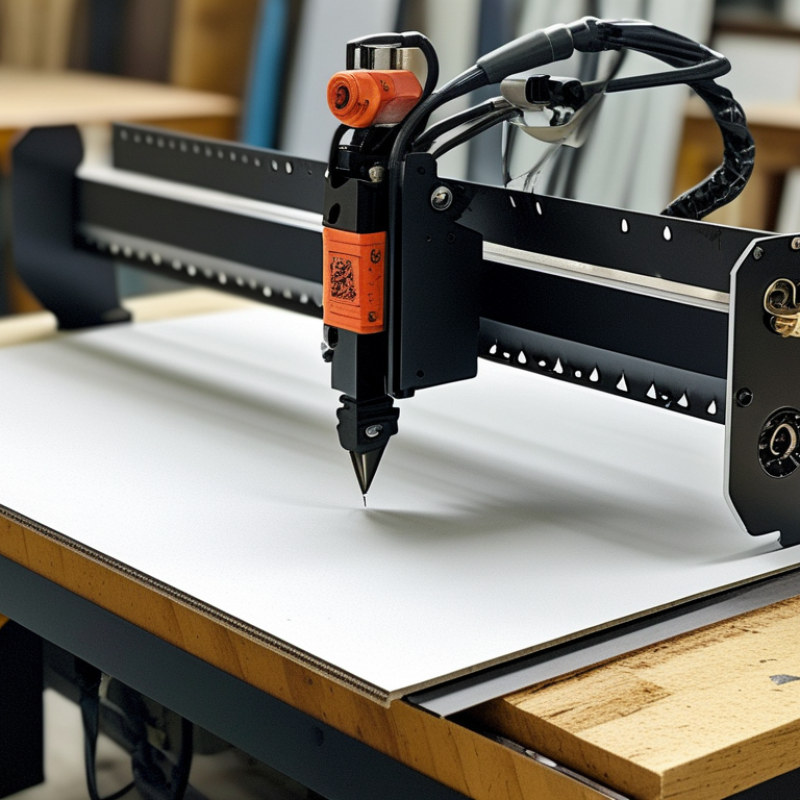
Define Your Cutting Goals and Material Requirements
Choosing a compact laser cutter starts with a precise cutting goal, not a tempting machine specification. Decide whether you need engraving, thin-sheet cutting, or both. Engraving requires fine motion control, while cutting depends more heavily on optical power, focus stability, and air assistance.
List your regular materials before comparing machines. Paper, cardboard, plywood, acrylic, leather, and coated surfaces behave differently under heat. Check each material’s thickness, composition, and recommended processing method. Avoid unknown plastics, especially those that may release corrosive or harmful fumes. Use a certified enclosure, effective extraction, and suitable eye protection. Ventilation is not optional.
Measure your workspace carefully. A compact cutter still needs room for cables, airflow, and material loading. Confirm the actual working area, not only the outside dimensions. I once underestimated the space needed for ventilation equipment. That was a mistake. Also inspect the focus system, emergency controls, interlocks, software compatibility, and replacement-part availability. These details affect reliability more than impressive speed claims.
Before purchasing, request or create small test files using your intended materials. Compare edge quality, smoke marks, engraving contrast, and repeatability. Keep a record of power, speed, passes, and focus height. Your first settings may be wrong. Treat them as useful evidence, not failure. A dependable choice matches your materials, workspace, safety practices, and expected workload.
Choose a Compact Laser Cutter by Material and Cutting Goal
Use this comparison to match your main material with a suitable laser category. Thickness figures are typical single-pass starting points for compact machines and vary with material density, focus, air assist, speed, and power.
How to read the chart: Diode lasers suit light-duty work such as thin plywood, leather, and dark acrylic. CO₂ lasers generally provide cleaner and deeper cuts in wood, acrylic, and leather. Fiber lasers are designed for marking and cutting thin metals such as stainless steel and aluminum.
Compare Laser Types, Power Levels, and Cutting Performance
Choosing the best compact laser cutter starts with the laser type, not the advertised wattage. Diode lasers suit wood, cardboard, leather, and some dark acrylic. They usually cost less and consume less space. CO2 lasers cut acrylic and plywood more efficiently, especially at moderate thicknesses. Fiber lasers are designed mainly for marking and cutting metals, but they require careful workspace planning. Each type has limits.
Power affects cutting performance, but it does not tell the whole story. A 10-watt diode laser may cut thin plywood slowly with several passes. A higher-powered model can reduce passes, yet excessive heat may darken edges or warp small parts. Air assistance helps clear smoke and improves edge quality. A rigid frame, accurate focus adjustment, and stable motion system matter just as much. I once judged a machine by wattage alone. That was a poor decision.
Test the cutter with your actual materials before trusting its specifications. Cut a small grid using different speeds and power levels. Watch for uneven corners, incomplete cuts, and excessive scorching. Measure the kerf, because narrow material gaps affect fitted designs. Ventilation and an enclosed working area are essential for responsible use. Some materials release harmful fumes, even when they appear harmless. Manufacturer testing can be useful, but real workshop results may differ. Compact machines often trade cutting area for portability. Check whether that compromise matches your typical project size.
Check Safety Features, Software, and Ease of Operation
When choosing a compact laser cutter, safety should influence every specification. In workshop testing, I check the enclosure, lid interlock, emergency stop, ventilation, and flame monitoring first. OSHA’s Technical Manual identifies laser radiation, fumes, fire, and moving parts as key hazards. A sealed work area is essential. So is a clearly visible status light.
Do not treat software as an afterthought. A useful system should preview the toolpath, estimate working time, flag unsupported files, and prevent unsafe settings. Grand View Research’s 2024 market analysis estimated the global laser cutting machine market at several billion U.S. dollars, showing how quickly these systems are becoming more accessible. Wider access also means more inexperienced operators. Simple controls matter.
Look for guided calibration and readable power-speed settings. Material libraries can reduce guesswork, but they are not always accurate. I still test scrap material before cutting a final piece. Maintenance access matters too. Filters should be easy to inspect, and software updates should not disrupt saved projects. A compact machine may fit on a desk, yet its safety equipment still needs proper clearance and ventilation. Small footprint, serious responsibility.
Assess Maintenance Needs, Costs, and Long-Term Value
How to Choose the Best Compact Laser Cutter for Your Needs
Maintenance can decide whether a compact laser cutter saves money or drains it. Inspect lenses, mirrors, filters, rails, and cooling lines regularly. Dust on optics can create uneven cuts and increase power use. A small air leak also matters. The U.S. Department of Energy’s Better Plants program reports that leaks can waste 20–30% of compressed-air output. That loss reaches your electricity bill.
Purchase price is only one part of total cost. Compare replacement optics, exhaust filters, cooling fluid, service access, and downtime. Grand View Research’s 2024 market analysis projects strong growth in laser cutting equipment through 2030. More users may mean better support, but not always lower ownership costs. Ask for service intervals and typical replacement prices in writing. I would not trust a low-cost estimate without testing material waste and setup time.
Tips: Run a timed sample cut before buying. Record power use, noise, warm-up time, and edge quality. Check whether common parts are stocked locally. Keep a maintenance log with dates and symptoms. It may feel excessive. It prevents guesswork. The U.S. Energy Information Administration’s industrial electricity data also shows why efficiency deserves attention, especially where machines operate daily. A cutter that is slightly slower but stable can deliver better long-term value.